Something that has always puzzled me with MOM 2005 and now System Center Operations Manager 2007 is that when I create a dynamic group of computers and one of the computers goes offline I don’t get a heartbeat. This seems like something that should work “out of the box “as all other monitors are dependent upon the server being up. Last year I posted a tool called the “watchanator” that addressed this issue. The “watchanator” worked well but was complicated to setup and needed to be run every time the dynamic group changed. Well now I have a better solution. This new solution may seem a little complicated as well first but is really very easy if you follow my simple steps.
1. Create the dynamic group, using the group wizard.
a. Give your dynamic group a name and select the unsealed management pack you want to store the group in.
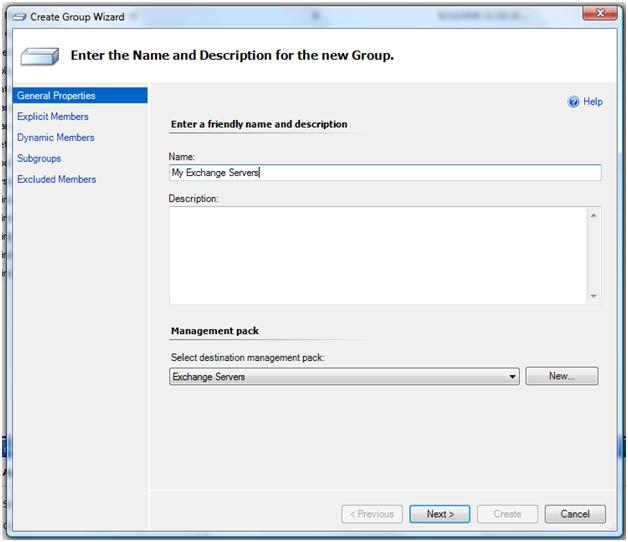
b. On the Explicit Members tab click next.
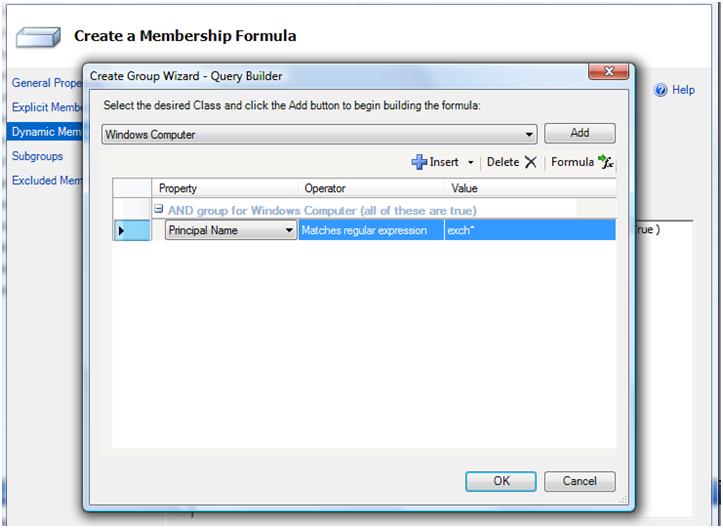
c. On the Dynamic Members tab click and create the formula you want to use to create you dynamic group. I used a simple one that dynamically includes all of my exchange servers.
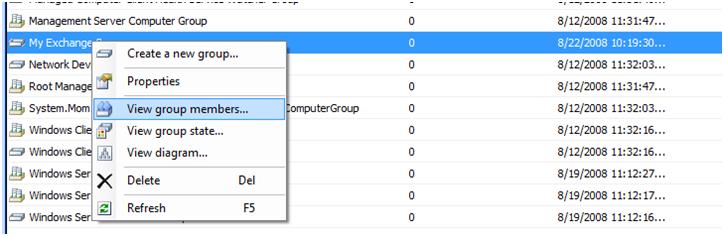
d. From the groups window, right click to verify that your dynamic group includes the computers you want.
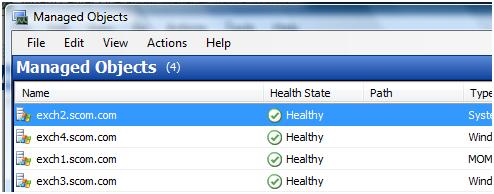
As you can see the dynamic group only contains windows servers and does not contain the heartbeat object (or agent watcher as it is know in scom)
2. Export the Management pack
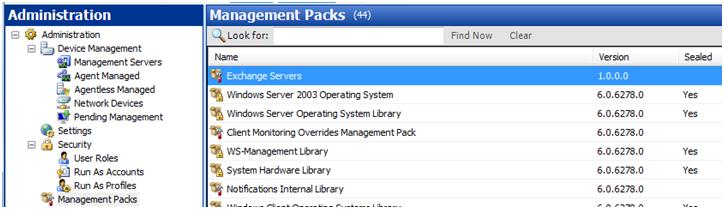
3. Open up the Management pack in any xml editor. I am using visual studio
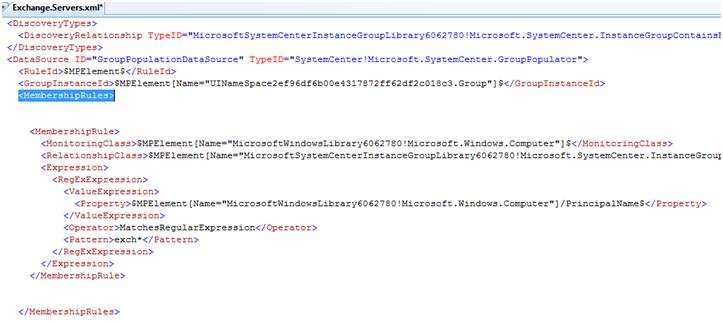
4. Search for <MembershipRules>. The membership rules make up the dynamic group. As you can see the first membership rule between <MembershipRule> and </MembershipRule> contains the formula that creates my dynamic group.
5. Now we need to add the code to include the health watchers. Open up watchers.xml available at https://www.scom2k7.com/downloads/Watchers.xml and copy the xml code.
Here is the code.
<MembershipRule>
<MonitoringClass>$MPElement[Name=”SystemCenter!Microsoft.SystemCenter.HealthServiceWatcher”]$</MonitoringClass>
<RelationshipClass>$MPElement[Name=”MicrosoftSystemCenterInstanceGroupLibrary6062780!Microsoft.SystemCenter.InstanceGroupContainsEntities”]$</RelationshipClass>
<Expression>
<Contains>
<MonitoringClass>$MPElement[Name=”SystemCenter!Microsoft.SystemCenter.HealthService”]$</MonitoringClass>
<Expression>
<Contained>
<MonitoringClass>$MPElement[Name=”MicrosoftWindowsLibrary6062780!Microsoft.Windows.Computer”]$</MonitoringClass>
<Expression>
<Contained>
<MonitoringClass>$Target/Id$</MonitoringClass>
</Contained>
</Expression>
</Contained>
</Expression>
</Contains>
</Expression>
</MembershipRule>
6. Paste this code after the first </MembershipRule> and before </MembershipRules> then save the file.
*Note if you choose another class other than Microsoft.Windows.Computer to create you dynamic group you will have to replace the line from watchers.xml with the matching line in your dynamic group membership rule.
<MonitoringClass>$MPElement[Name=”MicrosoftWindowsLibrary6062780!Microsoft.Windows.Computer”]$</MonitoringClass>
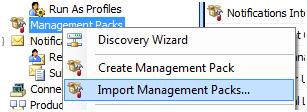
7. Save the MP and re-import the Management Pack into SCOM
8. Go back to your group and right click View group members
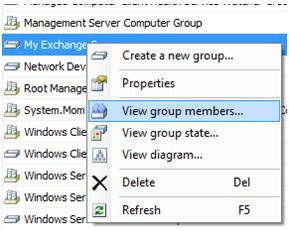
9. The health watchers may up to 20 seconds to populate. Push F5 a couple of times to refresh the screen.
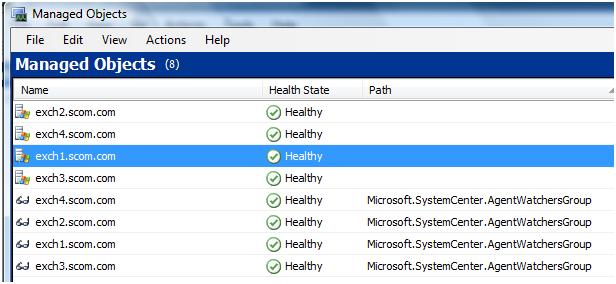
Now when we create a subscription to this group and a server in the group goes offline we will now get the heartbeat alert.
You download the sample management pack at https://www.scom2k7.com/downloads/Exchange.Servers.xml
You can also add the agent using a dynamic rule query:
( Object is Agent AND ( Windows Computer.NetBIOS Computer Name Matches regular expression [^$]IPGD[0-3][13579] ) OR ( Windows Computer.NetBIOS Computer Name Matches regular expression SERVERIPGD0[13579] ) )
The query above will get all the Health Service agents for the computers that match the regular expressions. If you want to also include the Windows Computer ojbect just add another or. I had to use this specific dynamic group for clustered DB servers.
can you find anything wrong in this rule?
$MPElement[Name=”Windows!Microsoft.Windows.Computer”]/IPAddress$
MatchesWildcard
172.27.10.???
$MPElement[Name=”SystemCenter!Microsoft.SystemCenter.HealthService”]$
$MPElement[Name=”Windows!Microsoft.Windows.Server.Computer”]$
$Target/Id$
I cannot import the MP because I get the following error:
not sure what is causing this issue.
Error 1:
: Failed to verify Discovery [UINameSpace20d6ebe6b56b45a5b84c9ef2617ba047.Group.DiscoveryRule]
Failed to verify referenced module : ID=GroupPopulationDataSourceInvalid configuration specified for Module [GroupPopulationDataSource]Cannot find MPElement: MicrosoftSystemCenterInstanceGroupLibrary6062780!Microsoft.SystemCenter.InstanceGroupContainsEntities specified in expression: $MPElement[Name=”MicrosoftSystemCenterInstanceGroupLibrary6062780!Microsoft.SystemCenter.InstanceGroupContainsEntities”]$Cannot resolve identifier [MicrosoftSystemCenterInstanceGroupLibrary6062780!Microsoft.SystemCenter.InstanceGroupContainsEntities] in the context of ManagementPack [MultiHost.Ping]. Unknown alias [MicrosoftSystemCenterInstanceGroupLibrary6062780]
——————————————————-
Failed to verify Discovery [UINameSpace20d6ebe6b56b45a5b84c9ef2617ba047.Group.DiscoveryRule] Failed to verify referenced module : ID=GroupPopulationDataSource Invalid configuration specified for Module [GroupPopulationDataSource] Cannot find MPElement: MicrosoftSystemCenterInstanceGroupLibrary6062780!Microsoft.SystemCenter.InstanceGroupContainsEntities specified in expression: $MPElement[Name=”MicrosoftSystemCenterInstanceGroupLibrary6062780!Microsoft.SystemCenter.InstanceGroupContainsEntities”]$ Cannot resolve identifier [MicrosoftSystemCenterInstanceGroupLibrary6062780!Microsoft.SystemCenter.InstanceGroupContainsEntities] in the context of ManagementPack [MultiHost.Ping]. Unknown alias [MicrosoftSystemCenterInstanceGroupLibrary6062780]
Francisco, it looks like your MultiHost.Ping Management Pack needs to have a reference added in the manifest section for the Microsoft MP [MicrosoftSystemCenterInstanceGroupLibrary6062780]. Try adding this and importing the MP or running MPVerify.exe against the MP. MPVerify is also built into the Authoring Console.
For this and more information on SCOM, check out our training at http://www.infrontconsulting.com/events.htm.
Thanks for this code it has helped alot, is it possible to explain how i could do the same for IIS role, Exchange Role and AD domain controller role could adapt this code in theory?
I tried the above and get the following error message when trying to import. I also tried deleted the original mp and reimporting:
Any ideas?
CriticalServers could not be imported.
If any management packs in the Import list are dependent on this management pack, the installation of the dependent management packs will fail.
The requested management pack was invalid. See inner exception for details.
Parameter name: managementPack
Verification failed with [1] errors:
——————————————————-
Error 1:
: Failed to verify Discovery [UINameSpace2b7107d4262d4f6e8968d70c0d9a2cc9.Group.DiscoveryRule]
Failed to verify referenced module : ID=GroupPopulationDataSourceInvalid configuration specified for Module [GroupPopulationDataSource]Cannot find MPElement: MicrosoftSystemCenterInstanceGroupLibrary6062780!Microsoft.SystemCenter.InstanceGroupContainsEntities specified in expression: $MPElement[Name=”MicrosoftSystemCenterInstanceGroupLibrary6062780!Microsoft.SystemCenter.InstanceGroupContainsEntities”]$Cannot resolve identifier [MicrosoftSystemCenterInstanceGroupLibrary6062780!Microsoft.SystemCenter.InstanceGroupContainsEntities] in the context of ManagementPack [CriticalServers]. Unknown alias [MicrosoftSystemCenterInstanceGroupLibrary6062780]
——————————————————-
Failed to verify Discovery [UINameSpace2b7107d4262d4f6e8968d70c0d9a2cc9.Group.DiscoveryRule]
Failed to verify referenced module : ID=GroupPopulationDataSource
Invalid configuration specified for Module [GroupPopulationDataSource]
Cannot find MPElement: MicrosoftSystemCenterInstanceGroupLibrary6062780!Microsoft.SystemCenter.InstanceGroupContainsEntities specified in expression: $MPElement[Name=”MicrosoftSystemCenterInstanceGroupLibrary6062780!Microsoft.SystemCenter.InstanceGroupContainsEntities”]$
Cannot resolve identifier [MicrosoftSystemCenterInstanceGroupLibrary6062780!Microsoft.SystemCenter.InstanceGroupContainsEntities] in the context of ManagementPack [CriticalServers]. Unknown alias [MicrosoftSystemCenterInstanceGroupLibrary6062780]
Here is my MP:
CriticalServers
1.0.0.0
CriticalServers
Microsoft.SystemCenter.Library
6.1.7043.0
31bf3856ad364e35
Microsoft.Windows.Library
6.1.7043.0
31bf3856ad364e35
Microsoft.SystemCenter.InstanceGroup.Library
6.1.7043.0
31bf3856ad364e35
Discovery
$MPElement$
$MPElement[Name=”UINameSpace2b7107d4262d4f6e8968d70c0d9a2cc9.Group”]$
$MPElement[Name=”SystemCenter!Microsoft.SystemCenter.HealthServiceWatcher”]$
$MPElement[Name=”MicrosoftSystemCenterInstanceGroupLibrary6062780!Microsoft.SystemCenter.InstanceGroupContainsEntities”]$
$MPElement[Name=”SystemCenter!Microsoft.SystemCenter.HealthService”]$
$MPElement[Name=”MicrosoftWindowsLibrary6062780!Microsoft.Windows.Computer”]$
$Target/Id$
$MPElement[Name=”MicrosoftWindowsLibrary6170430!Microsoft.Windows.Computer”]$
$MPElement[Name=”MicrosoftSystemCenterInstanceGroupLibrary6170430!Microsoft.SystemCenter.InstanceGroupContainsEntities”]$
$MPElement[Name=”MicrosoftWindowsLibrary6170430!Microsoft.Windows.Computer”]/OrganizationalUnit$
Equal
ou=critical,ou=jst,=ou=zservers,dc=ad,dc=ctcgsc,=dc=org
$MPElement[Name=”MicrosoftWindowsLibrary6170430!Microsoft.Windows.Computer”]/OrganizationalUnit$
Equal
ou=non-dynamic_dns_reg,ou=jst,ou=servers,dc=ad,dc=ctcgsc,dc=org
CriticalServers
CriticalServers
Critical_Servers_Group
Populate Critical_Servers_Group
This discovery rule populates the group ‘Critical_Servers_Group’
Hello,
I have a dynamically populated group. I want to create another group that is populated from healthwatcheragent objects that are included in the first group. I can use a contained expression in xml to populate the new group, but it mirrors the first one. Regular expression Expressions entered after the Contained statement has no effect. Entering the regular expression before the contained expression fails during import of the MP. Any ideas? Thnks, BT
XML that mirrors the first group to the second and regular expression has no impact.
rrrrrrrr
1.0.0.6
rrrrrrrr
Microsoft.SystemCenter.Library
6.0.6278.0
31bf3856ad364e35
AB_SOS_DiscoveriesAndGroups_MP
1.0.0.15
240c1aab2b6b0b06
Microsoft.SystemCenter.InstanceGroup.Library
6.0.6278.0
31bf3856ad364e35
Discovery
$MPElement$
$MPElement[Name=”UINameSpacec2875bcbb2564f1386b662d094f45945.Group”]$
$MPElement[Name=”SC!Microsoft.SystemCenter.AgentWatcher”]$
$MPElement[Name=”IGL!Microsoft.SystemCenter.InstanceGroupContainsEntities”]$
$MPElement[Name=”ABSOSDiscoveriesAndGroupsMP10015!AB_SOS_BiaDeferrableServers_ComputerAndWatcherGroup”]$
$MPElement[Name=”SC!Microsoft.SystemCenter.HealthServiceWatcher”]$
$MPElement[Name=”SC!Microsoft.SystemCenter.HealthServiceWatcher”]/HealthServiceName$
MatchesRegularExpression
(?i:^DEV*)
rrrrrrrr
aaatest
Populate aaatest
This discovery rule populates the group ‘aaatest’
These are the updates I had to make to the XML to get this to work in SCOMR2 RTM:
$MPElement[Name=”SystemCenter!Microsoft.SystemCenter.HealthServiceWatcher”]$
$MPElement[Name=”MicrosoftSystemCenterInstanceGroupLibrary6172210!Microsoft.SystemCenter.InstanceGroupContainsEntities”]$
$MPElement[Name=”SystemCenter!Microsoft.SystemCenter.HealthService”]$
$MPElement[Name=”MicrosoftWindowsLibrary6172210!Microsoft.Windows.Computer”]$
$Target/Id$
Great post..
1 quick question. After I create the Dynamic Group and add the Health Watcher Script script, Can I edit the Dynamic group query (to add more Servers in the future), without having to modify\export the Management Pack again?
Thanks
Andrew
Can this also be done with an OU Query (instead of Principal Name)?
Yes, I just used Principal Name as an example. Any dynamic group of computers will work with what I am doing here.
What about False Positives? I’ve been getting alot of false positives, when really, I’m more concerned with being alerted that the Server is actually offline.
I know that the Health Service Heartbeat Failure and the Computer not Pingable work alongside each other. Is there a way to just get the “Computer Not Pingable” alert, and not the “Health service heartbeat Failure” alert?
@ Seth and Francisco:
I had the same problems and solved this issue. The tip from rory is not bad. You have to change only a little part but not in the reference section. You have to change the following in the health service section:
original:
$MPElement[Name=”MicrosoftWindowsLibrary6062780!Microsoft.Windows.Computer”]$
changed:
$MPElement[Name=”MicrosoftWindowsLibrary606278100!Microsoft.Windows.Computer”]$
than the Health service watcher is included in your dynamical group.
Regards, Fabian
Jason is write for R2 users! You will have to change your MP Element attribute #’s. You can verify what the number should be if you look at the dynamic rule you created for the group in SCOM before you exported it. Make sure you update it accordingly from the watchers.xml code here.
For R2 it is:
6172210
Thanks Jason and whoever authored the original solution. Very very helpful!
I posted a question to the MS forums regarding a problem I am having with this XML code in case anyone has any feedback. Much appreciated!
http://social.technet.microsoft.com/Forums/en-US/operationsmanagerauthoring/thread/6cdce168-9823-4cce-be77-4bda24dba86d
Ok I was able to take this logic and apply it to add cluster objects as well. Here is my code.
$MPElement[Name=”Windows1!Microsoft.Windows.Cluster.Component”]$
$MPElement[Name=”MicrosoftSystemCenterInstanceGroupLibrary6172210!Microsoft.SystemCenter.InstanceGroupContainsEntities”]$
$MPElement[Name=”Windows1!Microsoft.Windows.Cluster.HostedGroup”]$
$MPElement[Name=”MicrosoftWindowsLibrary6172210!Microsoft.Windows.Computer”]$
$Target/Id$
Looks like my previous post did not inlcude all the XML tags. If you visit the following link and go to my last post you can find the complete code.
http://social.technet.microsoft.com/Forums/en-US/operationsmanagerauthoring/thread/6cdce168-9823-4cce-be77-4bda24dba86d
I am trying to make a dynamic group based on multiple Active directory OU’s with the health watcher. I cannot import the MP. I get the following error
The requested management pack was invalid. See inner exception for details.
Parameter name: managementPack
This is the XML Code.
ESD.OU.Tesst.Two
1.0.0.2
ESD OU Tesst Two
Microsoft.Windows.Library
6.1.7221.0
31bf3856ad364e35
Microsoft.SystemCenter.InstanceGroup.Library
6.1.7221.0
31bf3856ad364e35
Microsoft.SystemCenter.Library
6.1.7221.0
31bf3856ad364e35
Discovery
$MPElement$
$MPElement[Name=”UINameSpace462c1be2b85a4317945ad6c376af77f2.Group”]$
$MPElement[Name=”MicrosoftWindowsLibrary6172210!Microsoft.Windows.Computer”]$
$MPElement[Name=”MicrosoftSystemCenterInstanceGroupLibrary6172210!Microsoft.SystemCenter.InstanceGroupContainsEntities”]$
$MPElement[Name=”MicrosoftWindowsLibrary6172210!Microsoft.Windows.Computer”]/OrganizationalUnit$
ContainsSubstring
SEA
$MPElement[Name=”MicrosoftWindowsLibrary6172210!Microsoft.Windows.Computer”]/OrganizationalUnit$
ContainsSubstring
BEL
$MPElement[Name=”MicrosoftWindowsLibrary6172210!Microsoft.Windows.Computer”]/OrganizationalUnit$
ContainsSubstring
AUB
$MPElement[Name=”SystemCenter!Microsoft.SystemCenter.HealthServiceWatcher”]$
$MPElement[Name=”MicrosoftSystemCenterInstanceGroupLibrary6062780!Microsoft.SystemCenter.InstanceGroupContainsEntities”]$
$MPElement[Name=”SystemCenter!Microsoft.SystemCenter.HealthService”]$
$MPElement[Name=”MicrosoftWindowsLibrary6172210!Microsoft.Windows.Computer”]$
$Target/Id$
ESD OU Tesst Two
Test with more that one ou.
ESD OU Tesst Two
ESD OU Test Two
Populate ESD OU Test Two
This discovery rule populates the group ‘ESD OU Test Two’
Hiya,
I’ve managed to create a dynamic group and was wondering if anyone could assist with the code I’d need to add to send alerts if any machines in the group I’ve created go offline ?
I’ve manually added the machines I want to have monitored using “Explicit Machines” and “Dynamic” using thier IP addresses. I’m not sure that the “Health Monitor” is the agent I want to use – or if I should be using the “Ping Target” one ? Also as there are four classes for Ping – watcher, target, target role and utilities – Is “Ping Target” the right one ?
Thanks in advance for any answers – first time I’ve been introduced to SCOM2007 so a little bewildered with it all !!
Glen
i tried the above and getting the below error.
i have created a custom MP with registry entry as discovery using authoring console 2007 and then i imported to my SCOM environment which is SCOM 2012 SP1, after importing i created groups, views & monitors.
the error is below:
Management Pack could not be imported.
If any management packs in the Import list are dependent on this management pack, the installation of the dependent management packs will fail.
Verification failed with 1 errors:
——————————————————-
Error 1:
Found error in 1|CampaignOffice|1.0.0.0|UINameSpacedf4a846e18924f99a52d393cd3009528.Group.DiscoveryRule/GroupPopulationDataSource|| with message:
The configuration specified for Module GroupPopulationDataSource is not valid.
: Cannot find specified MPElement SystemCenter!Microsoft.SystemCenter.HealthServiceWatcher in expression: $MPElement[Name=”SystemCenter!Microsoft.SystemCenter.HealthServiceWatcher”]$
Cannot resolve identifier SystemCenter!Microsoft.SystemCenter.HealthServiceWatcher in the context of management pack COffice. Unknown alias: SystemCenter
——————————————————
Please suggest.
-vrkumar01
I got the same error as many others here:
Gemeente.Amsterdam.Waakdienst could not be imported.
If any management packs in the Import list are dependent on this management pack, the installation of the dependent management packs will fail.
Verification failed with 1 errors:
——————————————————-
Error 1:
Found error in 1|Gemeente.Amsterdam.Waakdienst|1.0.0.0|UINameSpaced760074b21d040499e15e62da5bc83a6.Group.DiscoveryRule/GroupPopulationDataSource|| with message:
The configuration specified for Module GroupPopulationDataSource is not valid.
: Cannot find specified MPElement MicrosoftSystemCenterInstanceGroupLibrary6172210!Microsoft.SystemCenter.InstanceGroupContainsEntities in expression: $MPElement[Name=”MicrosoftSystemCenterInstanceGroupLibrary6172210!Microsoft.SystemCenter.InstanceGroupContainsEntities”]$
Cannot resolve identifier MicrosoftSystemCenterInstanceGroupLibrary6172210!Microsoft.SystemCenter.InstanceGroupContainsEntities in the context of management pack Gemeente.Amsterdam.Waakdienst. Unknown alias: MicrosoftSystemCenterInstanceGroupLibrary6172210
——————————————————-
I had the same error on SCOM 2012 R2. I found how to modify the xml to make it work.
Here is my solution :
$MPElement[Name=”SystemCenter!Microsoft.SystemCenter.HealthServiceWatcher”]$ $MPElement[Name=”MicrosoftSystemCenterInstanceGroupLibrary7585010!Microsoft.SystemCenter.InstanceGroupContainsEntities”]$
$MPElement[Name=”SystemCenter!Microsoft.SystemCenter.HealthService”]$
$MPElement[Name=”MicrosoftWindowsLibrary7585010!Microsoft.Windows.Computer”]$
$Target/Id$
I’ve created the Dynamic Group for SCCM servers and followed steps to update the XML and import the MP. But the health watcher are not showing in the group. Please help!
tim, i’ve created a dynamic group based on this article. however after updating xml and import the unsealed mp i’m not able to view the health server agents in the group. what could be the problem, please help.
This process adds computers and corrrespondng Health Service Watcher to the group. How do I create a group which only contains Health Service Watcher for servers that are part of another group. I just need health service watcher in a group and add that group in the dashboard, I need to make sure I see ONLY heartbeat failure alerts for a specific group of servers in that dashboard.