
SCOM
SCOM 2007 Script to Monitor File Count inside a Directory
Below is a script that I wrote to monitor file count in a directory.
To Implement this please reference my earlier post on how to setup a Script-Based monitor. https://www.scom2k7.com/create-a-script-based-unit-monitor-in-opsmgr2007-via-the-gui/
In the Parameters: Dialog box you will need to specify a directory path in quotes then a space and the type in the number of files you what to have in your directory before you want to alarm.
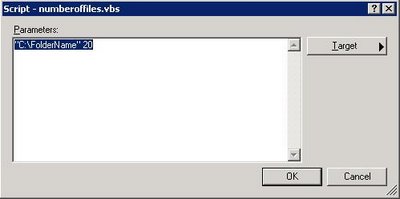
For Unhealthy Expression: Property[@Name=’State’] Equals BAD
For Healthy Expresion: Property[@Name=’State’] Equals GOOD
Dim oAPI, oBag, objFSO, objFldr, bSendError, strOut

bSendError = False

Set oAPI = CreateObject("MOM.ScriptAPI")
Set oBag = oAPI.CreateTypedPropertyBag(StateDataType)
Set eBag = oAPI.CreateTypedPropertyBag(StateDataType)
Set oArgs = WScript.Arguments


If oArgs.Count < 2 Then
strReturn = "Script aborted. Not enough parameters provided"
Call eBag.AddValue("State","BAD")
Call eBag.AddValue("ret",strReturn)
Call oAPI.Return(eBag)
WScript.Quit -1
End If


strOut = checkfolder(oArgs(0),int(oArgs(1)))

If bSendError Then
	strReturn = strOut
	Call oBag.AddValue("State","BAD")
	Call oBag.AddValue("ret2", objFldr.Files.Count)
	Call oBag.AddValue("ret",strReturn)


Else
	'WScript.Echo("GOOD "& vbNewLine &  strOut)
	Call oBag.AddValue("State","GOOD")

End If


if 0 <> Err.number Then
    strReturn = "An Error occured: " &  Err.Description
    Call eBag.AddValue("State","BAD")
    Call eBag.AddValue("ret",strReturn)
    Call oAPI.Return(eBag)
else

Call oAPI.Return(oBag)

end if


Function checkfolder(strfldname,numberfiles)

Set objFSO=CreateObject("Scripting.FileSystemObject")
Set objFldr=objFSO.GetFolder(strfldname)
If objFldr.Files.Count > numberfiles Then

checkfolder = numberfiles
bSendError = True

End If

End Function
This sample works great on a local folder but does not work on a network shared folder. If I put anything in the network folder an alert is generate no matter what the parameter count. Any ideas on using a script on a network shared folder?
That is because you will need to use a run-as account to connect to a network share. Everything by default runs as local system. Local system doesn’t have access to your network shares.
How do I configure the run as account to work with this monitor? THe network share is on an AS400 that is not part of the domain.
I’m getting the following error when the script runs.
The process started at 2:52:48 PM failed to create System.PropertyBagData. Errors found in output:
C:\Program Files\System Center Operations Manager 2007\Health Service State\Monitoring Host Temporary Files 39\546\CheckFolder.vbs(13, 25) Microsoft VBScript compilation error: Invalid character
I think it’s referencing the following line:Set oBag = oAPI.CreateTypedPropertyBag(StateDataType)
Here’s what I have in my script. Any ideas?
‘ Enter a script that outputs a property bag
‘ Example VBScript:
‘
‘ Dim oAPI, oBag
‘ Set oAPI = CreateObject(“MOM.ScriptAPI”)
‘ Set oBag = oAPI.CreatePropertyBag()
‘ Call oBag.AddValue(“Status”,”OK”)
‘ Call oAPI.Return(oBag)
On Error Resume Next
Dim oAPI, oBag, objFSO, objFldr
Set oAPI = CreateObject(“MOM.ScriptAPI“)
Set oBag = oAPI.CreateTypedPropertyBag(StateDataType)
Set oArgs = WScript.Arguments
MessageText = “”
If oArgs.Count Then
Call oAPI.LogScriptEvent(“Check.Folder.vbs”, 500, 0, “Script aborted. Not enough parameters provided.”)
WScript.Quit -1
End If
strFldr = oArgs(0)
NumberOfFiles = int(oArgs(1))
Set objFSO=CreateObject(“Scripting.FileSystemObject”)
Set objFldr=objFSO.GetFolder(strFldr)
If objFldr.Files.Count > NumberOfFiles Then
strReturn = “Number of Files in “ & strFldr& ” is greater than “ & NumberOfFiles
Call oBag.AddValue(“State”,“BAD”)
Call oBag.AddValue(“ret“,strReturn)
Else
Call oBag.AddValue(“State”,“GOOD”)
End If
Call oAPI.Return(oBag)
Not sure there are a few things wrong with it.
Download this one. https://www.scom2k7.com/downloads/countnumberoffileswithscom.zip
Hi,
Thx for your script, i could adapt it and test it in my MP.
But i have a question :
In the Alerting part, in the alert description box, I tried this :
“Test :
$Property[@Name=’ret’]$
$Data/Context/Property[@Name=’ret’]$
$Property[@Name=’State’]$
$Data/Context/Property[@Name=’State’]$
”
but in the alert description, I only get
“Test :
{0}
{1}
{2}
{3}”
Do you know how I can get strings contained in the oBag ??
Regards.
In the script you must use something like
Call oBag.AddValue(“ret”,strReturn)
Call oBag.AddValue(“ret2”,strReturn2)
Then in the description you would add somthing like this
$Data/Context/Property[@Name=’ret’]$
$Data/Context/Property[@Name=’ret’2]$
I think that the {0}
{1}
{2}
{3}”
part is because you need to re-trigger the alert. I had that happen to me too. It seems to also happen when you misspell a variable name.
The script looks like it will do what I need it to but how can I scope this to a single server. I have one server that I need to keep an eye on is there a way to do this in the SCOM 2007 R2 Monitor or can this script be modified to look at only one server. I am very much a rookie at scripting so any help is appreciated.
I am still fighting with this. All i need is to monitor a folder on a network share, to see if a new file is getting added, but im not sure what to use in Unhealthy Expression. Do i need both?
Property[@Name’State’] eq BAD
Property[@Name’ret’] greater than 0
Thanks in advance!
The script is working using just Property[@Name=”State”] eq BAD/GOOD, but the alert does not close it self. What do i use for HEALTHY expression?
Will a UNC work as a parameter instead of a logical local drive path, provided run-as profile was configured correctly?
Yes as long as you have a run as account.
Just enclose the UNC in quotes as a parameter?
Hi to all,
I’m a SCOM’ neophite and I’ve tried to setup this new monitor but at my console I don’t see any alert.
I’ve applied, as target,the monitor to the Windows2008 computer and created the monitor using a custom MP.
Do you have any idea how can I troubleshoot the problem?
thanks
Davide
Hello,
I tried the script with an UNC (\\\C$\ and 1 (file count), RUN as PROFILE/ACCOUNT, although there are more the 1 file in the , so far I don’t see any alerts. How can I make sure my script is working properly.
Thank you,
EPA
Thanks a lot Jim…!
Thanks, worked like charm under scom 2012
[…] The file count script from: https://www.scom2k7.com/scom-2007-script-to-monitor-file-count-inside-a-directory/ […]
[…] The file count script from: https://www.scom2k7.com/scom-2007-script-to-monitor-file-count-inside-a-directory/ […]