
SCOM Remote Maintenance Mode Scheduler 2.0 R2 Scripts
For SCOM 2012 please see my maintenance mode scheduling tool. https://www.scom2k7.com/scom-2012-maintenance-mode-scheduler/
I have updated the scripts for SCOM Remote Maintenance Mode Scheduler 2.0 to properly support SCOM R2.
Download: MaintenanceModeV4_R2.zip
The old scripts worked ok but if you had a large group of servers it would take a long time with R2. The old scripts would try to put the HealthService and the HealthServiceWatcher in maintenance mode which is no longer necessary with R2.
Another thing I added to the scripts was to not re-set the maintenance mode of a server if it is already in maintenance mode. I have seen instances where a particular server is put into maintenance mode for a long period of time and then a scheduled maintenance mode job will re-set the maintenance mode causing noise and skewed reports.
To install the scripts just rename the old scripts and then copy the new scripts into the same “C:\MaintenanceModeV4” directory.
**You will also might need to Remove the Security from the Downloaded PowerShell Scripts
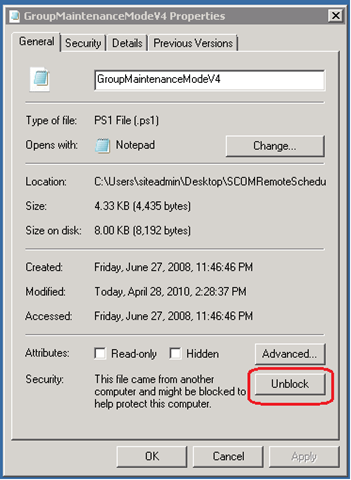
Please let me know if you come across any issues.
Awesome, thanks Tim!
Any plans to include network/snmp devices in the utility?
Cheers,
Aengus
If I create a group and the group name has a space in it and place member computers in it, this script will not put that group into maintenance mode. If I run powershell interactively it says “MYGROUPNAME not found”
This has always been a great tool. If I could figure out a way to have it check if the computer is a cluster node, and if so put the entire cluster and all its objects into Maintenance Mode, this would be the ultimate tool. I’ve been using a different script from Kris Bash to do that. While I can’t believe something like this isn’t in the product, I’m thrilled the community can provide such assistance. Thanks Tim!
Fantastic, Cheers Tim.
Works perfect in my R2 environment however, the script does not cater for group names containing a space as Doug has correctly pointed out. Brilliant, nontheless..
My lack of patience strikes again!! The script does indeed cater for groups containing spaces and it interacts beautifully with the the Availability Reports i.e. it highlights the period of planned downtime.
Absolute Genius Tool Tim thanks….
After launching the Scheduler and clicking create I keep getting this error: “The network path was not found. (Exception from HRESULT:0x80070035” What am i missing here?
You might be having a firewall issue. To to ping the box you are trying to create the task on.
Hi guys,
I get an access denied message when I try to schedule the maintenance. Any comments on this?
You are having a permission problem. Make sure you are a member of the SCOM admins and that you have admin access to the box that is going to be running the tasks.
I would really like to run this script at the opsmgr command shell, however when I try to run the script and entering parameters, it doesn’t seem to work. Should I just be able to run this at the OpsMgr command shell? Any suggestions how I can do this?
Hello,
I want to allow operator or advanced operators to be able to put computers into maintance mode without the need to them to be members of the SCOM Administrators group. How do I do this by running the script with a Run As Account and Run As profile?
Please advise, Thanks
Hi,
Thanks for keeping this tool so great !
Is there a way to put UNIX/Linux serveur in maintenance with your tool ?
Hi!
I have just start to use your nice script to scheduler SCOM agent into maintenance mode. Just one problem I don’t get the AM/PM when I choose a Start Date and Time
Maybe it can be that we use 24 hours clock.
How can I solve this?
Hello,
I am running SCOM scheduler 2.0 R2 and have added the new scripts as instructed. However, I get the following error when running the GUI: “Object reference not set to an instance of the object”. Not sure what this means. Please advise.
Check your firewall or permisions
The script has problems with dynamic filled groups,
for my citrix group the script returns 0 computers,
if I change this line:
$computers = $groupInstance.GetRelatedMonitoringObjects($windowsComputerClass,[Microsoft.EnterpriseManagement.Common.TraversalDepth]::OneLevel)
to
$computers = $groupInstance.GetRelatedMonitoringObjects()
it returns 22 computers.
When I tried putting a group after browsing the list of group I got the error:
“Object reference not set to an instance of an object.”
I found that in the comments section I was using a date that contained “/” (minus the quotes)which caused the problem. When I changed the date from “/” to use “-” it worked fine. For example a comment using 2/4/2011 would not work, but a comment using 2-4-2011 would work.
I was getting same error as Keithk from my RMS (SCOM 2007 R2 on Windows 2003 Standard x64 w/SP2), “Object reference not set to an instance of the object”. I followed his lead by removing punctuation from the comment. Then, I retried creating the task. Without the punctuation I was able to create the task successfully. Thanks for the tool!
Tim, this looks like a superb package for something which looks to take an inordinate amount of scripting, for all the other workarounds I’ve seen on the net. I’ve installed and configured it (I’m in 2007 R2) per all your instructions, and can create a scheduled event – it shows on both the SCOM scheduler list as well as the Task Scheduler – but the problem is, when the task is supposed to activate, it doesn’t. I’ve tried it a number of times, and I’m not sure, but I think I’ve see a quick instance of the shell pop up (with red text) for less than a second at start time. I run it on our SCOM server, which also serves as our RMS server as well.
Any thoughts you might have would be much appreciated – thanks in advance.
I cannot get this to work. It creates the task, and Task Scheduler states that it runs, although the servers never go into Maintenance Mode.
I am having an issue similar to Stephen Weber. I run the Remote Scheduler as my server administrator account, it successfully creates the task on the management server, the task either does not run, or runs successfully but does not place the target server in maintenance mode. If I copy the actions with arguments to powershell, the server goes into maintenance mode as intended. I did notice that you must have a comment in the “comment:” section or the script will fail. Error message displayed below:
“New-MaintenanceWindow : Cannot bind argument to parameter ‘Comment’ because it
is an empty string.
At C:\MaintenanceModeV4\AgentMaintenanceModeV4.ps1:23 char:75
+ New-MaintenanceWindow -startTime:$startTime -endTime:$endTime -comment:
<<<< $comment -Reason:$reason -monitoringObject:$computer
+ CategoryInfo : InvalidData: (:) [New-MaintenanceWindow], Parame
terBindingValidationException
+ FullyQualifiedErrorId : ParameterArgumentValidationErrorEmptyStringNotAl
lowed,Microsoft.EnterpriseManagement.OperationsManager.ClientShell.NewMain
tenanceWindowCmdlet"
Check the account you using to schedule the task. Go to the server that has the scheduled task and try to run the scheduled task. Do you get an error code? If so what is it?
[…] Manager community also has a tool for scheduling Maintenance Mode for monitored objects: https://www.scom2k7.com/scom-remote-maintenance-mode-scheduler-2-0-r2-scripts/ Additionally, you can use Orchestrator to put objects into Maintenance Mode on a schedule, and […]
[…] https://www.scom2k7.com/scom-remote-maintenance-mode-scheduler-2-0-r2-scripts/ […]
[…] https://www.scom2k7.com/scom-remote-maintenance-mode-scheduler-2-0-r2-scripts/ […]
I’m having difficulty importing the MPs. Specifically SCOM2012.Maintenance.Mode.Scheduler.Dashboard Version 5.0.0.1
ERROR:
The following dependent management packs are missing (Also cannot find in Microsoft Catalog):
Microsoft.SystemCenter.Visualization.Componen.Library Ver. 7.1.10226.1015
&
Microsoft.SystemCenter.Visualization.Library Ver. 7.1.10226.1015
Please Advise
You need the MPs the come with cu4 or cu5 installed. See http://blogs.technet.com/b/kevinholman/archive/2015/02/22/ur5-for-scom-2012-r2-step-by-step.aspx
[…] maintenance mode scheduler script he created in order to make it R2 ready. Please refer to the blog posting by Tim for more information and the download […]